
How-to
Connect a cable or satellite box to a Samsung TV
One HDMI cable, one input setting and, optionally, one remote for both. Here's the clean way to set up a set-top box with a Samsung TV.
Quick answer
Connect the box's HDMI OUT to a TV HDMI port with an HDMI cable, power both on and select that HDMI input on the TV. Set the box's output resolution to auto or one the TV supports. To use one remote, turn on Anynet+ (HDMI-CEC) or set up the TV's Universal Remote feature where available. No picture: wake the box, reseat the cable, try another port.
Connect it
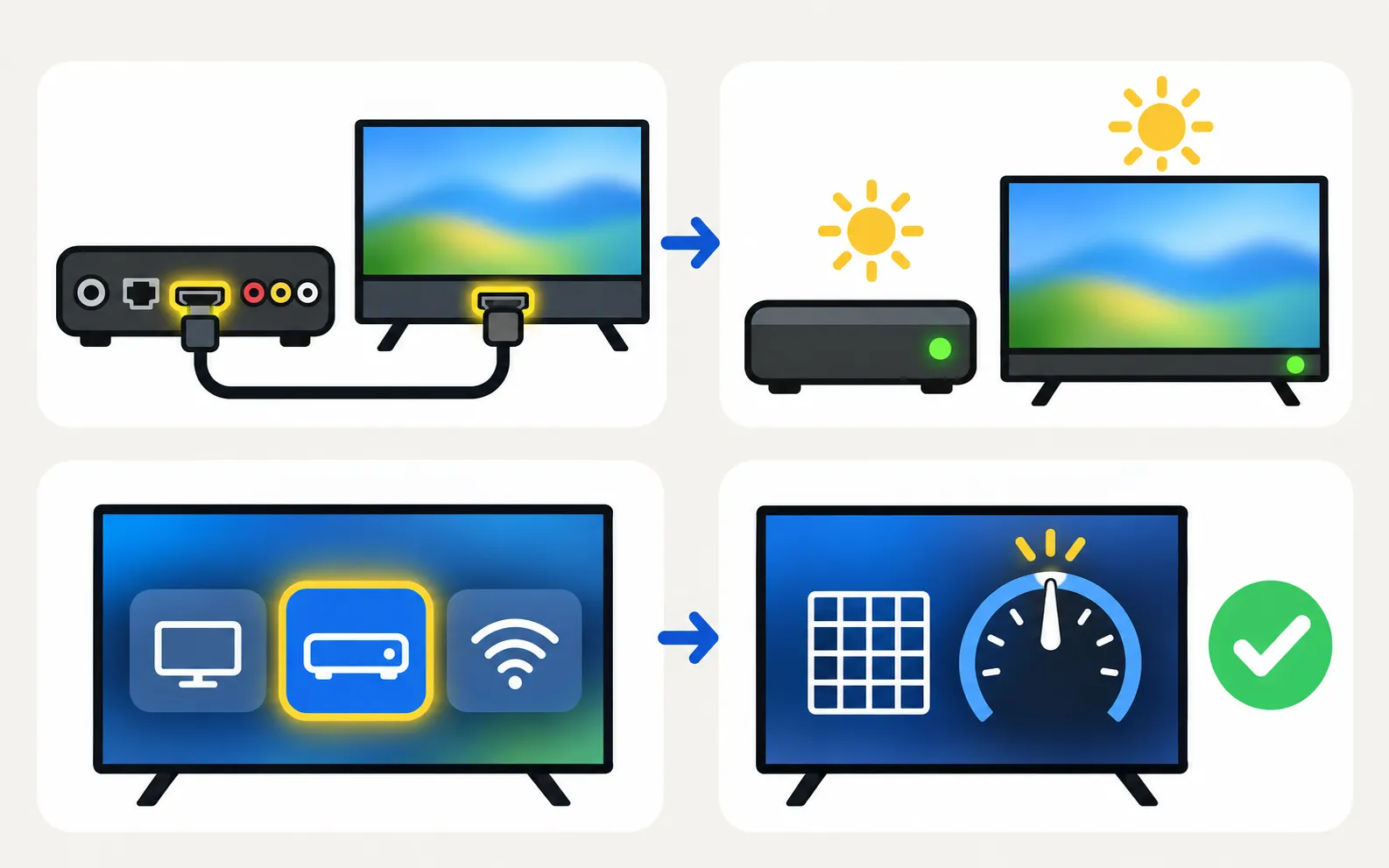
-
HDMI cable
Box HDMI OUT → any free HDMI port on the TV (or One Connect box). -
Power on both
Make sure the box isn’t in standby. -
Select the input
Home → Connected Devices/Source → the HDMI port you used (change the input). -
Set the box's video output
Auto, or 1080p/4K to match the TV.
One remote for both
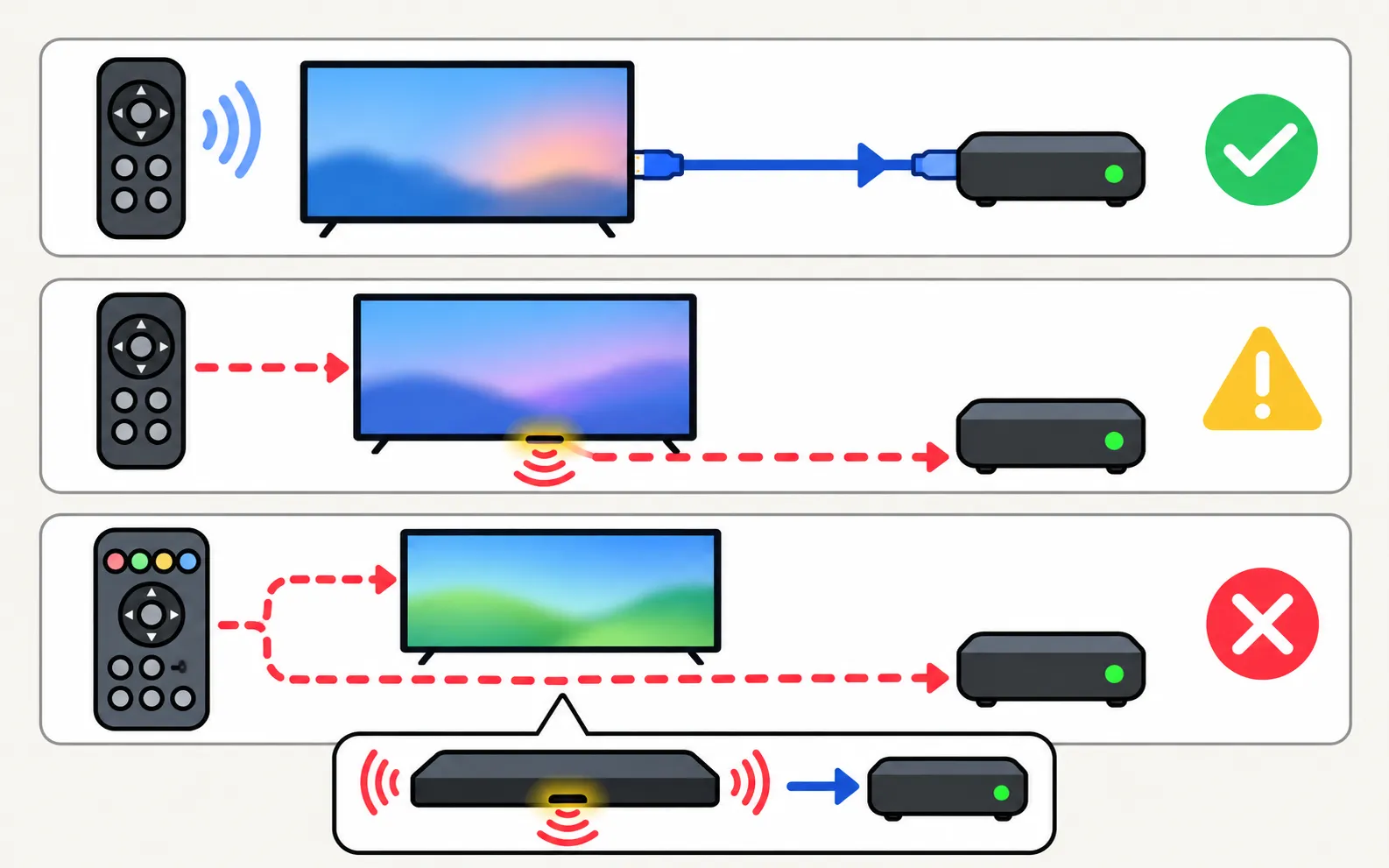
| Method | How | Notes |
|---|---|---|
| Anynet+ (HDMI-CEC) | Turn on Anynet+ on the TV and CEC on the box | Not all boxes respond to all keys (Anynet+) |
| Samsung Universal Remote (where available) | Run Universal Remote setup on the TV | Samsung: setup must be complete and the source must match the box’s input |
| Your provider’s remote | Program it for the Samsung TV | Codes and steps: cable and streaming remotes |
With a One Connect box, Samsung notes the box sends infrared from its front and sides — keep the set-top box in view of it.
Problems
- No signal: wake the box, reconnect the cable (box end first, then TV), try another port — Samsung’s HDMI no signal steps.
- No sound: try another cable and port; set the box’s audio to PCM or auto; Samsung suggests testing a different device to isolate the box (no sound).
- Picture cut off or stretched: picture size.
- TV turns on with the box: that’s Anynet+ (turns on by itself).
Using an antenna or the TV’s own tuner instead? See antenna setup and channel scan.
Frequently asked questions
Should I use HDMI or the old SCART/composite cable?
HDMI whenever both have it — it carries HD picture and sound in one cable. Older analogue connections are lower quality and missing on many new TVs.
Can the Samsung remote control my cable box?
Often yes, through Anynet+ (HDMI-CEC) or the TV's Universal Remote feature. Samsung's troubleshooting notes the Universal Remote needs setup completed and the right source selected.
The box picture is cut off at the edges. Why?
Overscan or a picture-size setting. Set the TV's picture size to 16:9 Standard or Fit to Screen.
No sound from the box, but apps have sound?
Check the box's audio output setting (PCM or auto) and try another HDMI cable or port.
Sources
- My TV doesn't detect a device connected via HDMI — Samsung UK · Samsung · checked November 11, 2026
- Samsung US troubleshooting: remote is not working (TSG10002214) — Samsung US · Samsung · checked November 10, 2026
- What is eARC and how to set on Samsung Smart TV (incl. Anynet+ paths 2014–2026) — Samsung Australia · Samsung · checked November 11, 2026
- Samsung TV has very low or no audio (TSG10002215) — Samsung US · Samsung · checked November 11, 2026
Related guides
Troubleshooting
HDMI no signal
Samsung TV says No Signal or won't detect HDMI? Wake the device, pick the right source, reconnect in Samsung's order, run HDMI Troubleshooting, check 4K 120 Hz.
How-to
Change the input
Switch HDMI inputs on a Samsung TV: the Source list on the Home screen, the TV's control button, a phone remote, HDMI-CEC from the device, or renamed inputs.
Explainer
Anynet+ (HDMI-CEC)
Anynet+ is Samsung's HDMI-CEC: one remote for TV, soundbar and console — and why TVs switch on by themselves. Where to find it by year and when to turn it off.
How-to
Cable and streaming remotes
Make an Xfinity, Roku, Fire TV or Apple TV remote turn your Samsung TV on and off and change volume: turn on Anynet+ (HDMI-CEC), then run the device's TV setup.
How-to
Antenna and channel scan
Connect an antenna or aerial to a Samsung TV and run Auto Program to find free channels: the menu path, antenna vs cable settings and what a new scan replaces.