

Troubleshooting
Apps not working
Samsung TV apps won't open, crash or keep loading? Power-cycle, check the internet, update the TV, reinstall the app, then reset Smart Hub — in Samsung's order.
Choose the area that matches your problem, then the symptom in your own words.
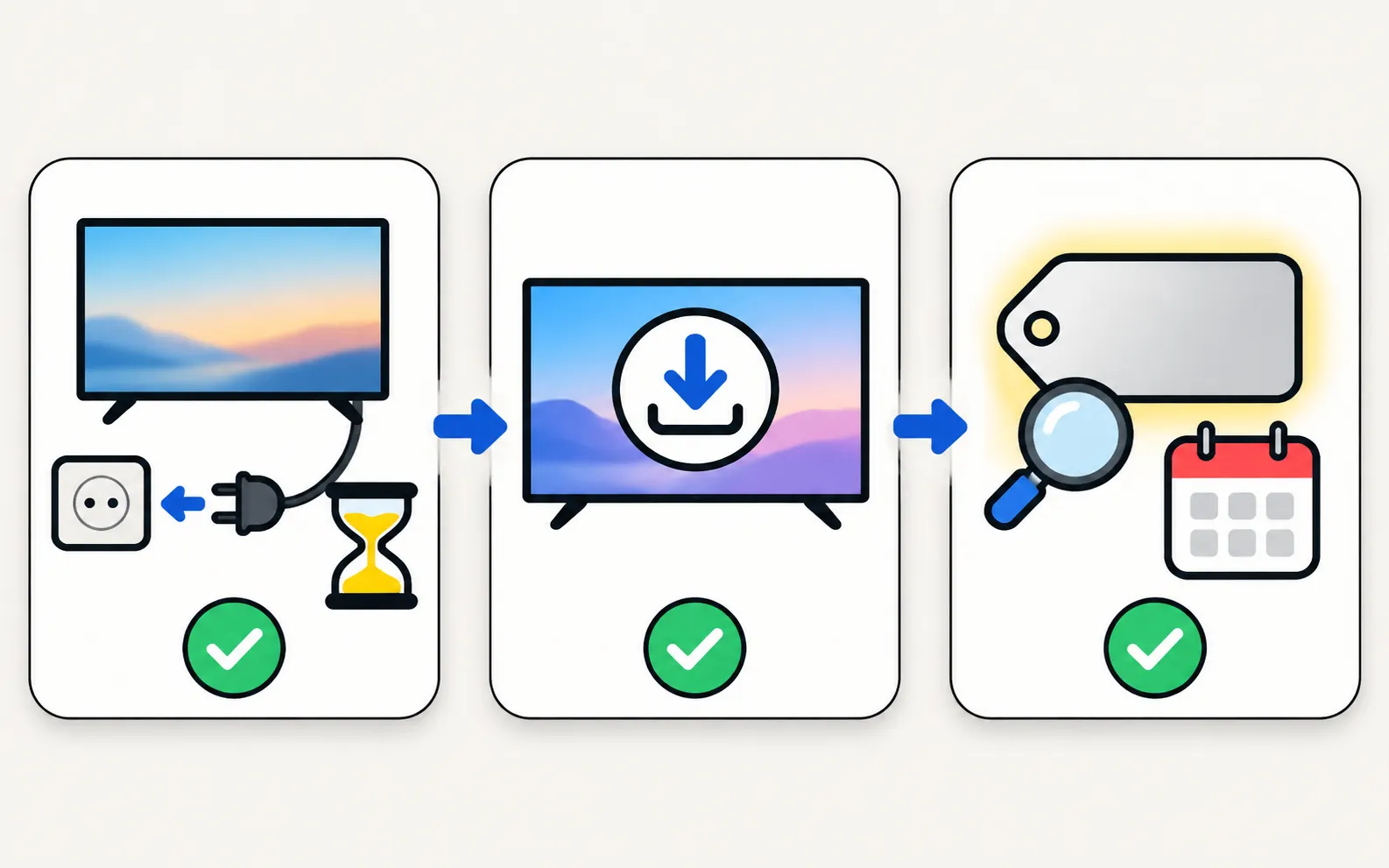
Before you dive into a specific guide, these general steps solve a surprising share of Samsung TV problems:
Cold-boot the TV
Unplug it (and any One Connect box) for 30 seconds, then plug it straight into a wall outlet. Standby isn’t a real restart.Update the software
Settings, Support, Software Update, Update Now — or by USB if the TV is offline. See update a Samsung TV.Know your TV's year
Menus and features change by year. The model number decoder tells you yours in seconds.Never open the TV’s case: if a guide ends in “request service”, that’s a job for a technician.
Nothing matches. Try fewer words.
Troubleshooting
Samsung TV apps won't open, crash or keep loading? Power-cycle, check the internet, update the TV, reinstall the app, then reset Smart Hub — in Samsung's order.
Troubleshooting
Can't find an app in your Samsung TV's store? Why apps depend on your country and TV year, what you can safely change, and workarounds that actually work.

Troubleshooting
YouTube won't open, keeps loading, shows a black screen or won't sign in on a Samsung TV? Restart, check network and date, update, reinstall, reset Smart Hub.
Troubleshooting
Netflix won't open, shows an error or black screen, or buffers on a Samsung TV? Read the code, restart, update, reinstall Netflix and, last, reset Smart Hub.

Troubleshooting
Channel scan finds nothing on a Samsung TV? Check the antenna and source, signal type, retail mode, signal strength and the right scan settings for your region.
Troubleshooting
Samsung TV says No Signal or won't detect HDMI? Wake the device, pick the right source, reconnect in Samsung's order, run HDMI Troubleshooting, check 4K 120 Hz.

Troubleshooting
Samsung TV shows no signal from a Switch 2 or Switch? Nintendo's checks (cable, AC adapter, direct connection, VRR), plus Game Mode and Input Signal Plus.
Troubleshooting
Samsung TV not showing in AirPlay, asking for a code every time or dropping out? Check support and the AirPlay switch, Wi-Fi, the code setting and updates.

Troubleshooting
Samsung TV not showing up for screen mirroring, connection drops, black screen or no sound? Fixes for Smart View, AirPlay and mirroring apps, by symptom.

Troubleshooting
SmartThings shows your Samsung TV as offline or the remote does nothing? Check the account, network and updates, enable Power On with Mobile and re-add the TV.
Troubleshooting
Phone can't find your Samsung TV? Turn the TV fully on, put both on the same home Wi-Fi, switch off VPN and guest networks, and allow local network access.
Troubleshooting
Why your Samsung TV keeps asking to Allow a phone, how to stop it, and how to undo a Deny — with the Device Connection Manager settings by TV year.

Troubleshooting
Samsung TV on but the screen is black? Check if the menu appears, the input and cable, energy-saving and screen-off settings, then do the torch test.

Troubleshooting
Lines on a Samsung TV screen? Find out in two minutes if it's a cable or a panel fault: see if the lines move, check the TV's own menu and run the Picture Test.

Troubleshooting
Samsung TV flickering? Turn off auto-brightness features and LED Clear Motion, check the HDMI cable and source, run the Picture Test and spot backlight faults.

Troubleshooting
Half the Samsung TV screen darker, dark spots or stuck pixels? Use the Picture Test to tell a source problem from a panel or backlight fault, then fix it.
Troubleshooting
Samsung TV showing a green, purple or pink tint, or washed-out colours? Separate settings, cable and panel faults with the Picture Test, then fix each one.

Troubleshooting
Samsung TV too dark or dimming on its own? Turn off Brightness Optimization, Energy Saving Solution, Motion Lighting, Contrast Enhancer and Adaptive Picture.

Troubleshooting
Samsung TV won't turn on? Read the standby light first — steady, off or blinking each point to a different cause — then follow the fixes for your case.

Troubleshooting
Why the red standby light on a Samsung TV blinks, what Samsung says each state means (steady, off, blinking), how to rule out the outlet and when it's a repair.

Troubleshooting
Samsung TV switching itself on at night or in the morning? Read the Event Log's power-on reason, then turn off Anynet+, Power On with Mobile or the trigger.

Troubleshooting
Samsung TV switching off on its own? Check Auto Power Saving, the sleep timer, Anynet+, devices, the power cable and software, and why it may shut off at start.

Troubleshooting
Samsung TV stuck restarting or rebooting to the logo? Isolate power, HDMI and USB devices, check Anynet+, update or reset safely, and spot a board fault.

Troubleshooting
Samsung TV remote not working? Reset it, do the 10-second phone-camera test, change or charge the battery, re-pair a Smart Remote and clear the TV's sensor.

Troubleshooting
Samsung remote light blinks twice, stays on or flashes when you press Power? What each pattern means (low battery, lost pairing, charging) and how to fix it.

Troubleshooting
Set up Bixby or Alexa on a Samsung TV, fix a microphone button that does nothing, and why Google Assistant disappeared from Samsung TVs in 2024.

Troubleshooting
Speed up a slow or freezing Samsung TV: cold boot, clear app cache in Device Care, delete unused apps, update the software and reset Smart Hub as a last step.

Troubleshooting
Samsung TV picture but no sound? Check mute and Sound Output, run the built-in Sound Test, rule out Bluetooth and soundbars, reseat HDMI and cold-boot the TV.

Troubleshooting
Samsung TV volume jumping up or down, too quiet, or crackling? Check the remote, Anynet+ and auto-volume features, run the Sound Test and reset the sound.

Troubleshooting
Voices out of sync on a Samsung TV? Find out if the source, a soundbar or Bluetooth causes it, then use Audio Delay, the soundbar's sync setting or a cable.

Troubleshooting
No sound from a soundbar on HDMI ARC or eARC? Use the ARC port, turn on Anynet+, set Sound Output and Digital Output Audio Format, enable eARC and fix dropouts.

Troubleshooting
Can't find Bluetooth on your Samsung TV? Where the Bluetooth list is for your TV's year, whether your model has Bluetooth audio at all, and what to do if not.

Troubleshooting
The Frame waking up, switching off or leaving Art Mode on its own? Adjust Motion Detector, Night Mode and Sleep After, then check HDMI-CEC and phone wake-ups.
Troubleshooting
Samsung TV won't connect to Wi-Fi or can't find your network? Check signal and band, run Network Status, reset the network, set DNS, restart the router, update.
Troubleshooting
Samsung TV dropping Wi-Fi every few minutes or after standby? Improve the signal, fix band steering and address changes, reset the network, or use a cable.

Troubleshooting
Samsung TV connected but apps say no internet? Run Network Status, set DNS to 8.8.8.8 in IP Settings, check date and time, restart the router, update the TV.
Troubleshooting
Samsung TV keeps buffering? Check the speed you need (Samsung: 25 Mbps for 4K), test the connection, move to 5 GHz or Ethernet and ease the router's load.