
App not available
Can't find an app in your Samsung TV's store? Why apps depend on your country and TV year, what you can safely change, and workarounds that actually work.
Topic
Samsung Smart TVs install apps from the Apps section of Smart Hub (Samsung's Tizen app store), not from Google Play. Most problems are fixed by a 30-second power cycle, a TV software update or reinstalling the app; Reset Smart Hub is the last resort. App availability depends on your country and the TV's model year.
| Task or problem | Guide |
|---|---|
| Install, update, delete or lock apps | Install and delete apps |
| Apps won’t open, crash or keep loading | Apps not working |
| An app isn’t in the store | App not available |
| Android apps and APKs | APKs and Google Play |
| Disney+, Max, Prime Video, Apple TV and more | Streaming apps |
| YouTube TV, Sling, Spectrum, Xfinity | Live TV apps |
| Free channels | Samsung TV Plus, Pluto TV, Tubi |
| IPTV, Plex, Kodi, Jellyfin | IPTV and media servers |
| Browse the web | TV web browser |
| Tidy the home screen | Organise the home screen |
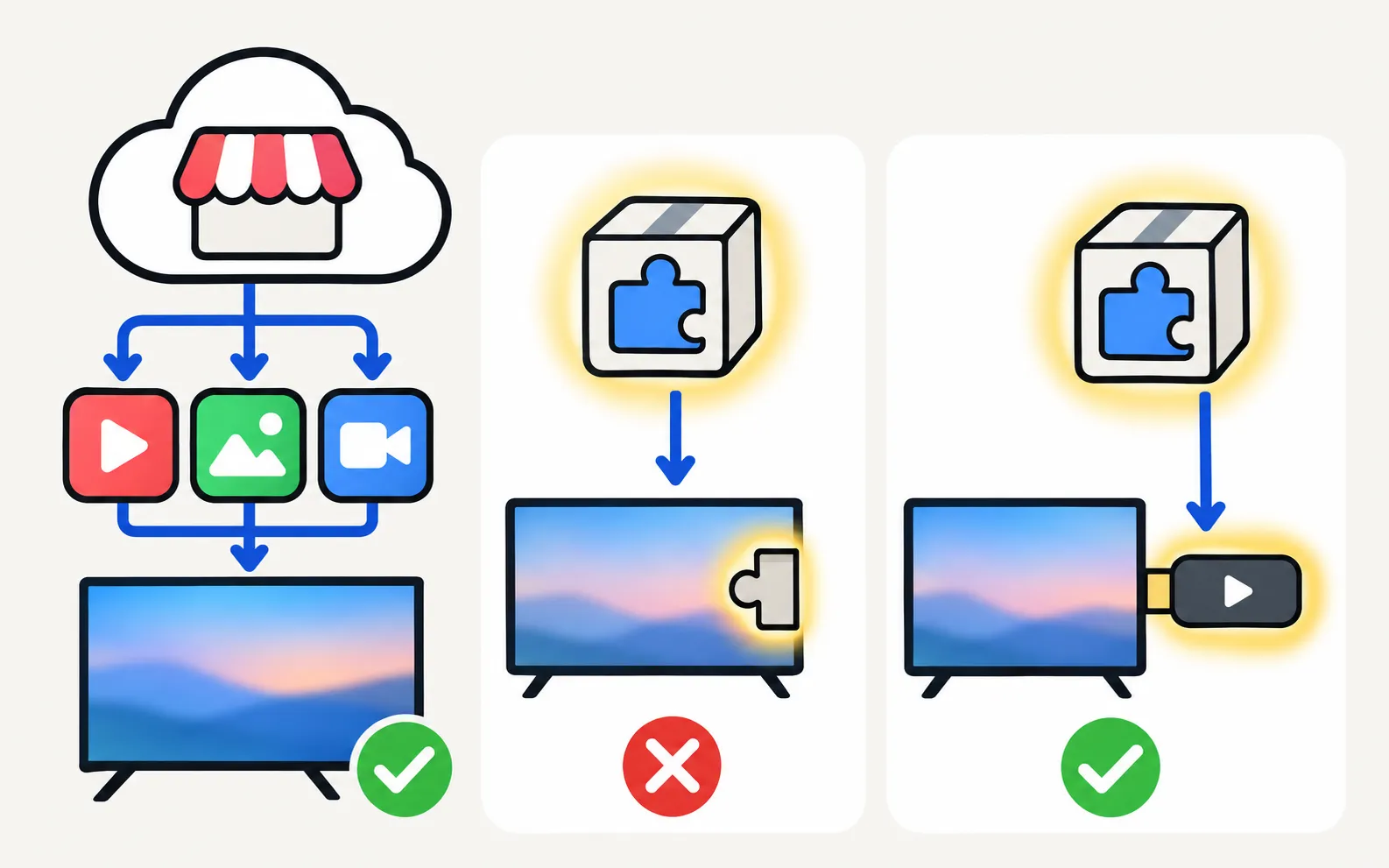
Samsung Smart TVs since 2015 run Samsung’s own Tizen system. Apps come from Samsung’s app store inside Smart Hub — the Apps section of the home screen. Which apps you see depends on your country and your TV’s model year: app makers decide where they publish and which older TVs they keep supporting.
Can't find an app in your Samsung TV's store? Why apps depend on your country and TV year, what you can safely change, and workarounds that actually work.
Samsung TV apps won't open, crash or keep loading? Power-cycle, check the internet, update the TV, reinstall the app, then reset Smart Hub — in Samsung's order.
Netflix won't open, shows an error or black screen, or buffers on a Samsung TV? Read the code, restart, update, reinstall Netflix and, last, reset Smart Hub.
YouTube won't open, keeps loading, shows a black screen or won't sign in on a Samsung TV? Restart, check network and date, update, reinstall, reset Smart Hub.
How to download apps on a Samsung Smart TV, keep them updated, delete or reinstall them, and what to do when Delete is greyed out — with Samsung's own steps.
Tidy a Samsung TV home screen: move app tiles with List Edit, remove shortcuts without deleting the app, lock apps, and delete the apps you never use.

Find and use the built-in web browser (Internet app) on a Samsung Smart TV: type addresses faster with a keyboard or phone, use a pointer and know its limits.
No: Samsung Smart TVs run Tizen, not Android, so APK files and Google Play won't install. Why sideloading guides mislead, and safe ways to get Android apps.
What Samsung TV Plus is, how it compares with Pluto TV and Tubi, how to find free channels on a Samsung Smart TV, and how to stop TV Plus starting by itself.
Watch your own media and legal IPTV on a Samsung TV: Plex and media-server apps, Kodi and Jellyfin, DLNA from a PC or NAS, and when a streaming stick is better.

Which Samsung TVs run YouTube TV (2017+), Xfinity Stream (2018+), Spectrum TV and Samsung TV Plus, how to install and activate them, and options for older TVs.
Get Disney+, Apple TV, Max, Prime Video or Crunchyroll on a Samsung TV: how to install them, which TV years each supports, and what to do if an app is missing.
Some Samsung TVs support video-call apps with a compatible USB or Samsung camera, depending on model and region. Check the Apps store on your TV and your model's specifications; a laptop connected by HDMI is the universal alternative.
No. Samsung TVs run Tizen and use Samsung's own app store. A streaming stick adds Google TV or Fire TV apps if you need them.
App makers sometimes end support for older TV models, or an app isn't offered in your region. The app-availability guide explains the workarounds.